
Boxer 0.86 20090718-1 has been released, which fixes a couple of bugs and tweaks some interface strings. This version is also up on the Boxer betacast and will appear as an automatic update for previous betas.
At the same time, I figured some users might be interested in a peek at the iterative rewriting process that Boxer’s interfaces go through.
In the newest 0.86 betas, Boxer will ask you after game installation if you’d like to import the original installation files into your new gamebox. These files then become available to the game as a fake CD-ROM drive. This is necessary for games that still need access to those files after installation: usually, CD-based games that only install part of their total files. Boxer 0.8 and up would already offer to do this after installing from a physical CD: but now Boxer offers to after installing from any installation source, such as a regular folder of files copied from a CD.
The first released version of the interface for that choice looked like this:
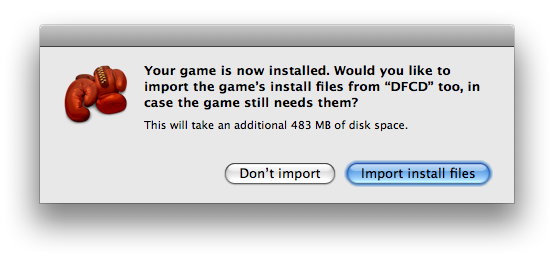
This is unsatisfactory: the window tells you broadly what would happen (the installation files would be imported), but not why you would need to do so, nor what effect this would have on the game.
After a few iterations, it became this:
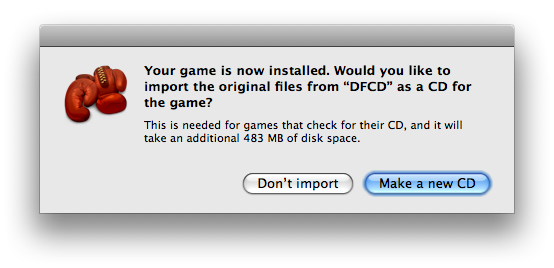
This is better: the window now specifies why you would choose to import the files (because games that check for a CD will need them), and what effect it would have (the files would become a new CD for the game).
However, the wording is clunky and ambiguous: users could mistakenly think that Boxer would burn a physical CD from those files. The buttons also refer to two separate concepts: “importing” and “making a CD.”
A few more iterations later, and we have this:
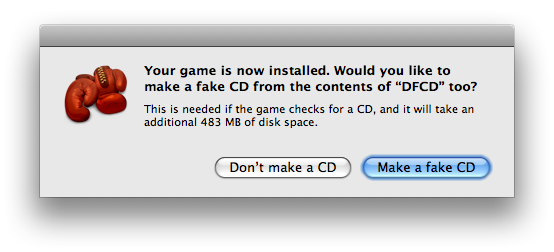
Clearer still: the text flows better and does away with the distracting “importing” verb, instead focusing on the more familiar notion of “making a CD.” It also clarifies that the CD will be “fake”, as opposed to a real, physical CD. (This is a sufficient description, as the user doesn’t need to know how Boxer handles fake CDs: just that they won’t need to burn a real one.)
However in the quest for brevity, the text no longer indicates a connection between the fake CD and the game itself. The brevity is also deceptive, since the folder label (“DFCD”) could be much longer and would then wrap to a third line anyway. So we can spend a few more words to clear this up:
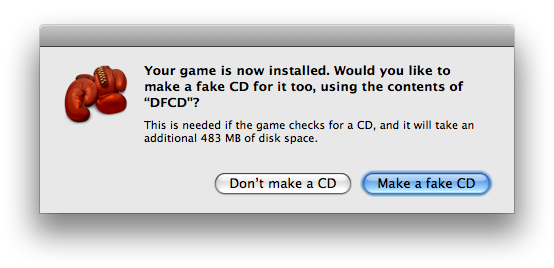
This is the final window used by the new 20090718-1 beta. We’ll see how long it lasts before being rewritten again.

Hot on the heels of my previous abortive attempt to make Daggerfall installation easier, here’s Boxer beta 0.86-20090718-1. This time I’ve got it right, I promise.
You can play Daggerfall with Boxer thusly:
Download Boxer and put it wherever you like on your Mac (replace any older copy with it). If this is your first time using Boxer, start it up once to let it set up its stuff.
Download Daggerfall from Bethesda’s website. Once it finishes, doubleclick on the downloaded archive (DFInstall.zip) to extract it, if Safari hasn’t already done so.
(It may take you several tries to download–it kept getting cut off halfway for me, leaving me with a broken archive. The final filesize should be 148.7 MB.)
Drag the extracted DFInstall folder onto Boxer’s “Drop games here to install them” droplet. Daggerfall’s installer will now start up.
Tell the installer to install the game to your hard drive, and agree to all the default options. Once the sound-card selection screen comes up, tell it to auto-detect your digital soundcard and then choose ‘MPU-401’ (with the default port) as your MIDI card so that you’ll get music.
Once the game has finished installing, close the DOS window. We could start playing the game already, but we really should patch it first. We’ll get there, I promise.
Boxer will now tidy up the installation, and ask if you’d like it to make the game’s installation files into a fake CD for the game:
Choose to “Make a fake CD”: this will keep the game happy when it checks for a Daggerfall CD at startup.
Daggerfall is now fully installed into a nice tidy Daggerfall gamebox in your DOS Games folder. It’s named DFCD right now, but you could rename it to Daggerfall or whatever you like.
That was easy, I hear you thinking. It’s already done, and I still have time to watch TV or do some sewing.
You see, when it was first released, Daggerfall was just a collection of monstrous game-ruining bugs, and it needs updating to be worth playing. Fortunately though, Bethesda have included the latest Daggerfall patch in with the stuff you downloaded. So to update the game:
Right-click on your Daggerfall gamebox and choose "Show package contents": a Finder window will come up, showing you what’s inside the gamebox. Open up the DAGGER folder that you’ll see inside.
In the original Bethesda stuff you downloaded (in the DFInstall/DAGGER folder) you’ll find a program called DAG213.EXE: this is the patch we need. Drag DAG213.EXE into the DAGGER folder inside the gamebox.
Double-click on DAG213.EXE: the patch program will now start up in DOS. Answer yes whenever the patch asks you something.
Once the patch finishes, you can type DAGGER to play the game (or just close the DOS window.)
Daggerfall is now as up-to-date as it will ever be, and is ready for you to play in earnest. From now on, you can just doubleclick on your Daggerfall gamebox to play the game. The first time you do, Boxer will ask which of the game’s programs you want to run: choose DAGGER.EXE, and Boxer will never bother you again.
Feel free to trash the files you downloaded from Bethesda, as they’re no longer needed. If you like, give the gamebox to your Mac-loving Boxer-having friends so they’ll be able to play Daggerfall too, without needing to install or patch the damn thing themselves.
Have fun assigning those skill points!
Read Bethesda’s 21-step instructions for running Daggerfall in DOSBox. Marvel at all the things you didn’t have to do.
Edit: a special not-crashing-at-startup edition is now available! Download 0.86-20090711-1 here.
This beta includes DOSBox 0.73 and has a laundry list of improvements to game installation, compatibility and overall cleverness. Which is fortunate, because Daggerfall was just released for free by Bethesda today, and Boxer 0.85 has drive-space issues that can prevent it from installing.
As intimated in previous posts this version is not related to the 0.9 betas, but is instead a maintenance update to the 0.8x branch. That means there's no shiny Cocoa UI or friendly DOS I'm afraid. 0.9 beta users will probably want to download this anyway though, since DOSBox 0.73 gives significantly improved game performance and compatibility. An update to the 0.9 branch will be along soon hopefully.
This beta is not ready for primetime release, as it still needs localising and a lot of testing. Please report any crashes you find or other bugs you notice, and be sure to mention if a game that was working in 0.85 now isn't.