
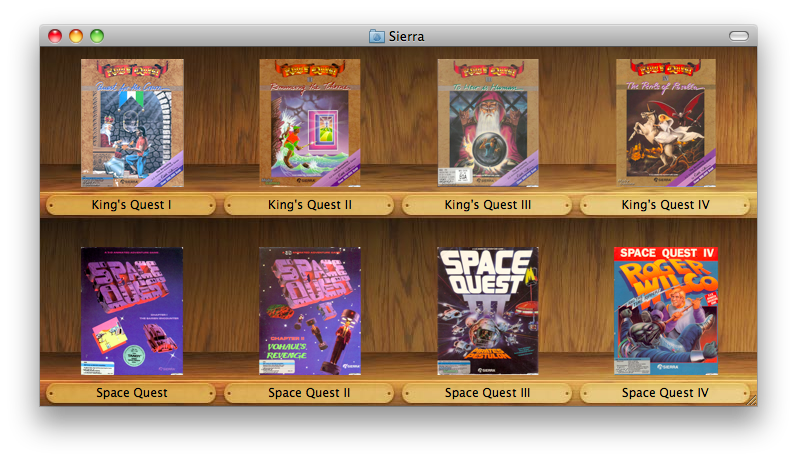
Boxer 0.87 (née 0.86) has now, finally, been released. There’s a chummy what’s-new summary on the front page, or the tediously complete release notes if you prefer. In brief though: Snow Leopard compatibility, 8 months’ worth of bugfixes, tasteful wood panelling.
I wanted to get this version out there right away, since the crumbly old 0.85 release was disastrously broken on Snow Leopard (which hit the streets this Friday.) There will probably be a minor followup release in the next week or two with additional localisations.
Unfortunately Snow Leopard forced my hand in another respect: the new 10.6 Finder alters the icon view layout and refuses to show background images larger than 2048x2048, both of which broke my original shelf art. I’ve applied a quick fix whereby 10.6 gets a different (and much smaller) background, which means folders have fewer shelf slots before the art runs out. I hope to address this with a more thoughtful and robust solution in future updates… once I see whether the shelf idea appeals to Boxer’s users in the first place.
Rapidly growing irritation with Snow Leopard edit: The default Finder grid spacing has changed for new user accounts, meaning that the shelf icons may appear misaligned. To correct this: open DOS Games, press CmdJ and pull the grid spacing slider all the way to the right.

As further proof that I have absolutely no idea what ‘beta’ is supposed to mean, recent Boxer 0.86 betas include some fairly fundamental internal changes. Of these, two will actually be visible and relevant to you:
![]()
Boxer’s “built-in” DOS utilities and Gravis Ultrasound drivers are now actually built-in: they are kept inside Boxer itself, instead of being copied into your DOS Utilities folder. This saves you about a dozen megabytes, and me a lot of heartache when the utilities need updating.
The DOS Utilities folder still works, but is now solely for your own personal programs and not Boxer’s. You can safely delete the REQUIRED and ULTRASND folders from your existing DOS Utilities, as these are leftovers and unused by Boxer.
Boxer's default DOSBox settings are now also built-in, instead of being mixed up with your own settings in ~/Library/Preferences/Boxer/DOSBox Preferences.conf. In fact, that preferences file is no longer used by the latest betas: if you have customised any settings, you should now put them in ~/Library/Preferences/Boxer/Shared Preferences.conf. This new file is solely for your own personal settings, and not Boxer’s.
The rationale behind these changes is to minimise Boxer’s reliance on files that are out there in Userland. This makes it harder for you to break Boxer’s intended behaviour (not that you would ever do such a thing) and much easier for me to push updates that don’t trample all over your personal stuff.
At the other end of the feature spectrum, the latest Boxer beta applies an ostentatious game-shelf appearance to the icon view for new DOS Games folders. Here’s how it looks:
Out of courtesy, Boxer will not apply this appearance to your existing DOS Games folder: only to new games folders it makes. If you want this appearance for your existing DOS Games folder, then the simplest way is:
There are other ways, but they’re complicated and hard to explain. If you don’t want to trash files, send me an email and I’ll walk you through it.
Cover Flow is still the default view for the DOS Games folder in OS X 10.5, but you can switch to the shelf appearance by choosing icon view from the Finder View menu. You will also need to adjust the folder’s View Options panel if you want it to always use this view mode.